C# Switch Statement and Switch Case: Complete Guide
Updated April 2026 to cover C# 6 through C# 13, including switch expressions, relational patterns, extended property patterns, and list patterns.
Switch statements have been part of C# since the beginning. For a long time they were useful but limited: clean for simple exact matches, frustrating the moment you needed ranges or anything more complex.
Microsoft has changed that considerably over the last several versions. What started as a rigid constant-matching tool is now a flexible pattern matching system that handles ranges, types, object properties, and list structures.
This guide walks through every significant change from C# 6 through to C# 13, using the same practical scenario throughout so you can see exactly how the syntax evolves. By the end you'll know which form fits which situation and why the newer versions exist.
Already prepping for a C# interview too? Our backend developer interview guide and technical assessment preparation guide are worth a read before you go in.
What are switch statements?
A switch statement is a control flow construct that tests a variable against a set of values and executes code based on which one matches. In C#, the switch has grown from a simple equality-check tool into a full pattern-matching system that can test types, property values, ranges, and sequence shapes.
The scenario used throughout this post: a method that takes an integer representing a candidate's years of experience and returns a string describing their experience level. The rules are:
- 0 years: Inexperienced
- 1 to 2 years: Beginner
- 3 to 5 years: Intermediate
- More than 5 years: Expert
C# 6: The classic switch statement
Before C# 7, switch statements could only match against constant values: specific integers, strings, enum members, or other compile-time constants. That works fine when you're testing for exact values, but it creates a problem with ranges.
Here's the C# 6 approach for the scenario:
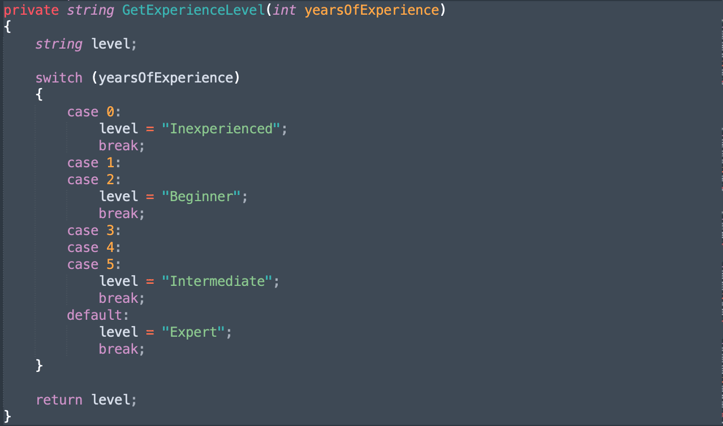
Figure 1. Switch statement in C# 6
This works, but notice what's happening for the Beginner and Intermediate cases: you're listing every integer individually. That's manageable when the range is small. Scale it up, say you want to match "1 to 20 years" as a category, and you're writing twenty case labels.
The `default` case handles "Expert" because there's no clean way to say "anything greater than 5" in a switch at this point. You're relying on the fact that if nothing else matched, it must be high. That logic works here, but becomes fragile if the input can be negative or invalid.
Every case also requires a `break` to exit. Forgetting it causes fall-through to the next case, which is rarely what you want.
C# 7: Pattern matching and `when` clauses
C# 7 (released March 2017) introduced pattern matching to switch statements. The key addition is the `when` keyword, which lets you attach a condition to a case label. Combined with type patterns, this makes range-based matching practical.
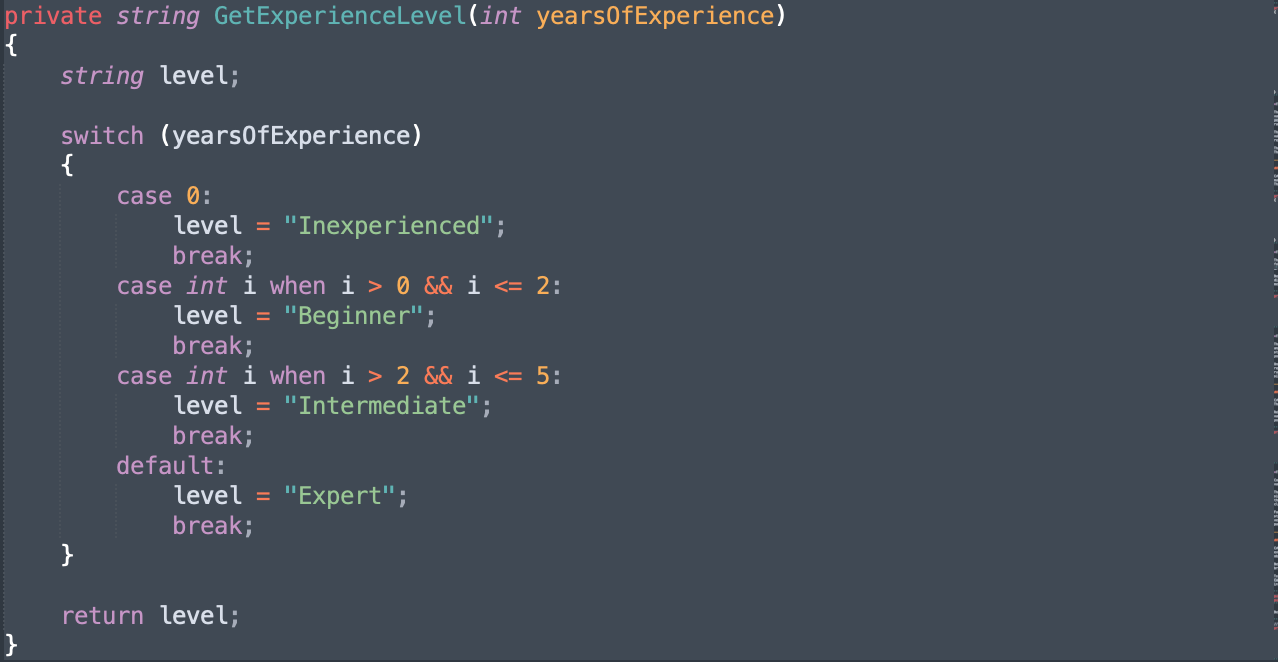
Figure 2. Switch statement in C# 7
The `case int i when i > 0 && i <= 2:` pattern does two things. First, it declares a variable `i` and verifies the matched value is an `int` (it always will be here, since `yearsOfExperience` is already typed as `int`). Second, the `when` guard applies the range condition. The variable `i` is scoped to that case block.
This solves the range problem without listing every integer. It also handles negative values cleanly: add `case int i when i < 0:` before `case 0:` and you're done, no restructuring required.
The structure is still a statement, so you still need `break` at the end of each case. The code is more expressive than C# 6, but also more verbose.
C# 8: Switch expressions
C# 8 (released September 2019) introduced the switch expression. The distinction matters: a switch statement executes code, a switch expression evaluates to a value. This shift in form produces noticeably more compact code.
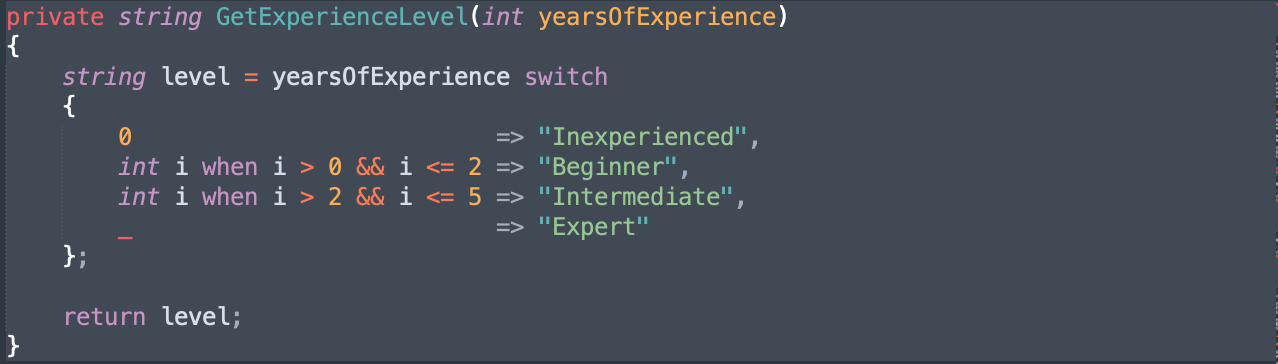
Figure 3. Switch expression in C# 8
The switch keyword now appears after the variable being matched. Each arm is a pattern followed by `=>` and a result value, with arms separated by commas. The discard pattern `_` replaces `default`. There are no `case` keywords and no `break` statements.
Because the whole thing is an expression, you can assign it, return it, or pass it directly. That means you can collapse the method further using an expression-bodied method:
The `when` guards from C# 7 carry over into switch expressions, so you're not losing anything. You're just writing less boilerplate. The exhaustiveness check is also stricter: if the compiler can determine that not all inputs are covered, it will warn you. The `_` pattern ensures full coverage.
One thing to note: switch expressions require that every reachable input maps to a result. If you omit the discard pattern and some value doesn't match any arm, the runtime throws a `SwitchExpressionException`. The classic switch statement would silently fall through to the end without returning anything.
C# 9: Relational and logical patterns
C# 9 (released November 2020) added relational patterns and logical pattern combinators. These are the changes that make range matching feel natural rather than workaround-ish.
Relational patterns let you use `<`, `>`, `<=`, and `>=` directly as patterns, without a variable declaration or a `when` guard. Logical combinators `and`, `or`, and `not` let you compose patterns cleanly.

Compare this to Figure 4. The `int i when i > 0 && i <= 2` arm is now `> 0 and <= 2`. No variable, no `when`, no `&&`. The condition reads like a constraint rather than a guard.
The `and` combinator here means both relational patterns must match. `or` works similarly, `not` negates a pattern. Precedence follows `not` before `and` before `or`, the same as Boolean algebra. Use parentheses if you're combining all three and want clarity.
For integer range matching specifically, this is where the syntax effectively stabilises. C# 9 patterns are concise, readable, and cover the scenario well. The next versions added new pattern types for different use cases, not better ways to do this particular thing.
C# 10: Extended property patterns
C# 10 (released November 2021) didn't change how integer range patterns work. It added extended property patterns, which improve how you match against nested properties on objects.
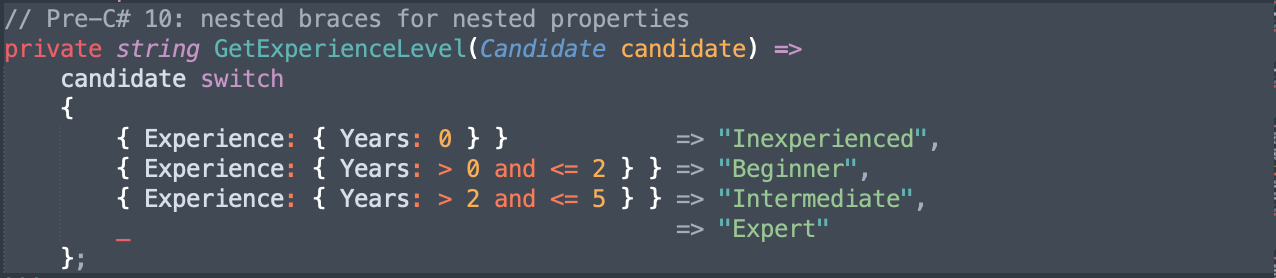
Before C# 10, matching a property that lives inside another property required nested brace syntax. C# 10 lets you use dot notation instead, flattening the structure.
To show this, the scenario needs to evolve slightly. Suppose the method now receives a `Candidate` object rather than a plain integer, and `Candidate` holds its experience data in a nested `Experience` record:

Before C# 10, matching on `Experience.Years` inside a switch looked like this:
With C# 10 extended property patterns:
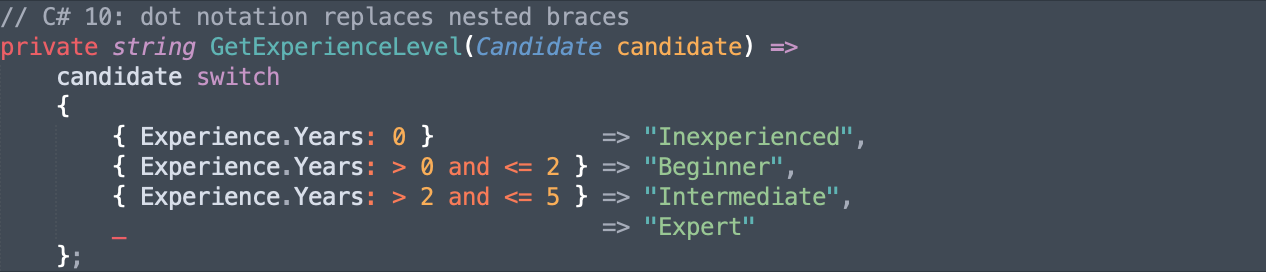
Figure 6. Extended property patterns in C# 10
The nested `{ Experience: { Years: ... } }` collapses into `{ Experience.Years: ... }`. For a single level of nesting, the difference is modest. For two or three levels deep, it becomes a significant readability improvement.
You can also combine multiple extended property patterns in one arm. For example, `{ Experience.Years: > 5, Experience.Domain: "Engineering" }` matches a candidate with more than five years in a specific domain, all in a single, readable arm.
C# 11: List Patterns
C# 11 (released November 2022) added list patterns, which let you match arrays, lists, and other indexable sequences against a structural description of their contents.
To demonstrate this, the scenario shifts to matching a group of candidates represented as an array of experience values:
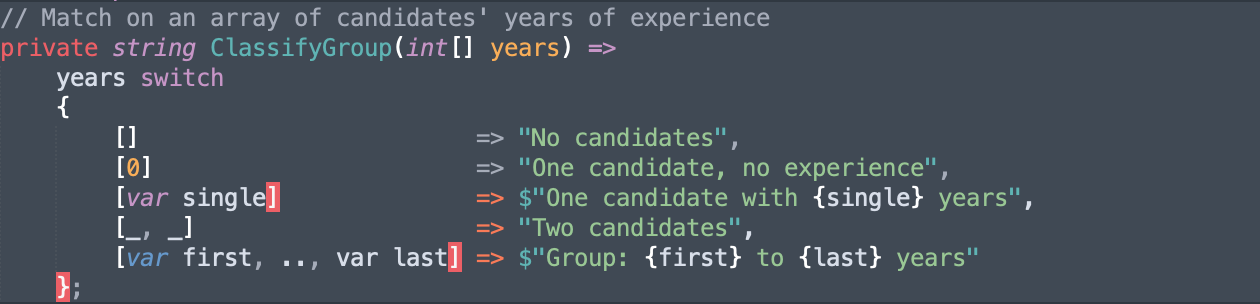
Figure 7. List patterns in C# 11
Each arm describes the shape of the array. `[]` matches an empty array. `[0]` matches an array containing exactly one element equal to zero. `[var single]` matches any single-element array and captures the value. `[_, _]` matches any two-element array without capturing either. `[var first, .., var last]` matches any array with at least two elements, capturing the first and last while the slice pattern `..` absorbs everything in between.
List patterns work with arrays, `List<T>`, `Span<T>`, `ReadOnlySpan<T>`, and any type that supports indexing with an `int` indexer and has a `Count` or `Length` property.
C# 11 also extended pattern matching to work directly with `Span<char>` and `ReadOnlySpan<char>`, letting you match them against string constants without converting to `string` first. That's useful in high-performance parsing code where you want to avoid heap allocations.
C# 12 and C# 13: No major switch changes
Neither C# 12 (released November 2023) nor C# 13 (released November 2024) introduced new switch or pattern matching features. Those releases focused on other areas: primary constructors, collection expressions, `params` collections, a new `lock` type, and improvements to `ref` and iterators.
If you're on .NET 8 or .NET 9, the switch syntax from C# 9 through 11 is fully available and there's nothing new to learn specific to switch.
FAQ
What is a switch expression in C#?
A switch expression, introduced in C# 8, evaluates to a value rather than executing statements. Instead of case: labels and break keywords, you write pattern-result arms separated by commas. Example: x switch { 0 => "zero", _ => "other" }.
What is the difference between a switch statement and a switch expression?
A switch statement executes code blocks. A switch expression produces a value you can assign, return, or pass directly. Switch expressions are more concise, have stricter exhaustiveness checking, and were introduced in C# 8.
When should you use pattern matching in a switch?
When you're matching ranges, types, or object properties rather than simple constants. If you're matching a handful of exact values, the traditional form works fine. Pattern matching pays off most when the alternative would be a deeply nested if/else chain.
What C# version introduced switch expressions?
C# 8, released in September 2019.
What is the most modern way to write a switch in C# 13?
C# 13 didn't add new switch syntax, so the most modern form is the switch expression with relational and logical patterns from C# 9. For integer range matching that looks like x switch { 0 => "Inexperienced", > 0 and <= 2 => "Beginner", > 2 and <= 5 => "Intermediate", _ => "Expert" }.
And if you're looking for a new tech role using C#, we've got you covered, sign up to hackajob here, and you could be starting your next job in just weeks. Let employers contact you directly for roles that match your skills and career goals. You can also apply to roles that truly fit what you are looking for.
Like what you've read or want more like this? Let us know! Follow us on socials where we post daily bite-sized tech content and tips: X (Twitter), LinkedIn, TikTok, Instagram, and YouTube.